Custom Bot v3.23.1: five new modules and the long list behind them

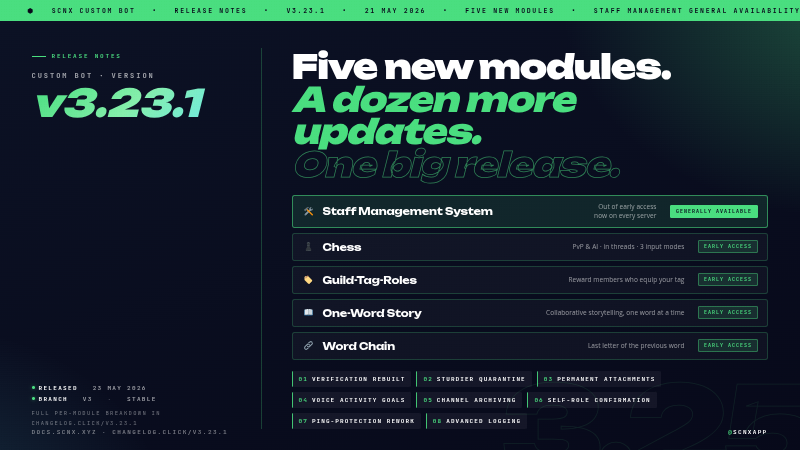
Big one for the SCNX Custom Bot today. v3.23.1 is rolling out on the v3 stable branch - here's the short version:
- 🛠️ Staff Management System is out of early access. Available on every server now.
- ♟️ Four more modules join in early access: Chess, Guild-Tag-Roles, One-Word Story, Word Chain.
- 🔐 Verification has been rebuilt. New in-channel flow, no DMs required.
- 🛡️ Quarantine is sturdier. It now holds up across bot restarts, member rejoins, and staff stripping the role manually.
- 📥 Permanent attachment storage. Moderation evidence and starboard images upload to your scnx file library, so they keep working long after Discord's CDN URLs would have expired.
Plus the usual long list of polish and fixes across nearly every module.
Staff Management System is now available to everyone
Staff Management has been the most-requested module on Featureboard for a long time, and after months of early-access testing on member servers it's now live on every server, on every plan. It's a single module designed to replace the patchwork of bots, spreadsheets and forum threads most servers end up cobbling together to run their team.
What's in it:
- ⏱️ Shifts. Clock in, clock out, take breaks. Configurable duty types, weekly or monthly quotas, a duty-time leaderboard, and an audit channel that records every shift event.
- 🌴 Leave of absence and reduced activity. Members request time off inside Discord, supervisors approve in one click, and the bot can auto-assign a status role for the duration.
- ⚠️ Infractions and suspensions. Warnings, strikes, demotions, terminations, "under investigation" markers. Temporary suspensions strip staff roles for the duration and restore them when the suspension ends.
- 🎖️ Promotions. One command, optional auto-assignment of the new role, and a customisable announcement.
- 👤 Staff profiles and reviews. 1 to 5 star ratings, review history, reputation tracking that members can contribute to.
- ✅ Activity checks. Periodic check-ins on selected roles with full responded, missing, and follow-up tracking.
- 🔐 Three-tier access. Staff, Supervisor, and Management role tiers each unlock the appropriate command level.
Enable it from the module catalog. The setup guide walks through the first-run configuration.
Four new modules in early access
The other four ship today in early access for ScootKit Membership early-access holders, with general availability in the usual 3 to 4 month window.
♟️ Chess
Full chess against other server members or the built-in AI, played out in dedicated threads so long games don't choke
your main channel. Three ways to move (algebraic in chat, a popup with notation input, or guided dropdowns), live
material balance in the embed, auto-flipping board renders so you always see your own pieces at the bottom, AI on Easy,
Medium, or Hard, draws, resignations, history, and configurable move timeouts with reminder pings. Start with /chess challenge @user or /chess challenge-ai.
🏷️ Guild-Tag-Roles
Reward users who equip your server's guild tag with one or more roles. The bot adds the configured roles when the tag is activated and removes them when it's taken off. The role list is configured in module settings.
📖 One-Word Story
Collaborative storytelling where each member adds exactly one word at a time. Configure story channels, an optional archive channel, and a moderator role. Supports word caps, idle hints, and customisable milestones.
🔗 Word Chain
Each new word starts with the last letter of the previous one. Pick the channels it runs in, set a minimum word length,
and decide whether words can repeat. Includes milestone messages, idle hints, and /word-chain reset for moderators.
Verification, without the DMs
The old verification flow DMed users a captcha. A lot of people have DMs disabled by default these days, and when that happened the bot couldn't reach them. The fallback was usually "ask a mod", which kind of defeats the point of having an automated gate.
The new flow moves the entire thing into the channel. The user clicks a Verify Me button on the verification message, the challenge appears for that user only, they solve it, they get the role.
Three modes to pick from:
- Captcha (default). A captcha image rendered directly in the channel, only visible to the user. Right default for most servers.
- Simple. A quick math problem or word challenge in a popup. Less bot-resistant but much faster for humans. Useful for audiences that would bounce off a captcha.
- Manual. Users press a button to request verification, staff approve or deny it from the log channel. Right pick for invite-only communities.
The old captcha is still there as Captcha (DM, legacy), so existing setups keep working untouched. The new flow also gives users multiple attempts (default 3) with a cooldown between tries (default 5 minutes), instead of punishing on the first failed try. The punishment duration is configurable too (default 1 hour), so a typo doesn't earn a permanent mute.
Quarantine that actually sticks
A few server owners wrote in about quarantine being trivially worked around. They were right. Three problems we fixed:
- Leave-and-rejoin defeated it. A user could shed the quarantine role by leaving the server and rejoining. The role wasn't reapplied. It is now, no matter how long they were gone. Works for every trigger: manual, Join Gate, Anti-Join-Raid, Anti-Grief, AutoMod, failed verification, and the message filters.
- Other bots and reaction roles could grant access back. New opt-in option Strip new roles from quarantined users. Any role added to a quarantined user (via Discord's role picker, a reaction role, or another bot) gets removed automatically. Server boosts and managed roles are left alone.
- Staff could bypass the audit log by removing the role manually. New opt-in option that reapplies the quarantine
if a staff member strips it without running
/moderate unquarantine, and posts a log entry naming who did it. Forces every unquarantine through the auditable command path.
Alongside that, a stack of smaller moderation fixes. Channel locks no longer skip roles whose write permission was
inherited from the server or category level. Repeated anti-spam and anti-raid triggers don't stack actions on the same
user anymore. Long moderation reasons no longer crash the log entry. /moderate ban with days actually deletes
messages again (Discord.js renamed the option, we caught up). Unmute and unquarantine preserve role prefixes and active
streak suffixes on the nickname instead of wiping them off.
Permanent attachment storage
If you've been on SCNX long enough you've probably seen this one. A moderation case from six months ago, you click the evidence link, "this image is no longer available". Discord's CDN URLs expire. The image was always gone, the link was just silently rotting.
v3.23.1 fixes that for the two places it stung most:
- Moderation evidence. Attached proof files upload to your scnx file library, and the case log links to the permanent URL.
- Starboard images. Images on starred messages upload to your file library and embed via a permanent link, so pinned highlights from a year ago still render.
There's also a new opt-in setting in Advanced Logging, Archive attachments from deleted messages, for servers whose policy supports retaining deleted-message content. Off by default.
Stored files count against your file-storage quota. If you'd rather not have any of this, the new Disable attachment archival core setting opts out of everything in one toggle. Features that depend on permanent URLs will fall back to the old behaviour and break when Discord's URLs expire, but it's your call.
Other things worth pulling out
Two more headline additions that didn't fit a section of their own:
- Temp Channels: Channel Archiving. When everyone leaves a temp channel, it can now be moved to a hidden archive category instead of being deleted. When the creator rejoins the creation channel, their archived channel is restored with its previous settings (public or private mode, allowed users) intact.
- Team Goals: Voice Activity Goals. Staff can now be evaluated on voice activity alongside the existing message
goal. Weekly voice-minute targets, per-role overrides, a
/team-goals voice-progresscommand, separate achieved-and-failed message templates, and%voiceMinutes%and%voiceGoal%placeholders.
And a grab bag of changes most servers will notice:
- Self-role dropdowns now confirm before applying. Picking roles in a self-role dropdown opens an ephemeral confirmation listing what will be added or removed. Apply or cancel. The original public message stays untouched.
- Admin Tools: Always-Temporary Roles and Role Bans. Define roles that auto-expire after a configurable duration
(e.g.
24h), and roles that auto-ban anyone who gets them. Members with Manage Roles are exempt from role bans. - Welcomer: treat join roles as base roles. Opt-in setting that keeps every regular member's join roles in sync. If one gets removed, the bot adds it back, including after a quarantine release. Quarantined and pending members are excluded so it doesn't interfere with moderation.
- Levels: daily stats and richer level-ups.
/profileshows messages today and voice time today next to lifetime totals. Level-up messages get seven new placeholders (%xpGained%,%xpType%,%totalXP%,%nextLevelXP%,%totalMessages%,%messagesToday%,%voiceTimeToday%). New/calculate-levelcommand shows exactly how much XP a target level costs. - Birthday: a lot of it. A Set Birthday button on the embed (configurable label), an option to disable year
input, a Components V2 layout, a user-display-mode picker (mention, tag, or nickname), daily channel cleanup,
pre-birthday notifications with configurable lead times, and a new
/birthday upcomingsubcommand. - Ping Protection: reworked user panel.
/ping-protection user panelis now a dropdown-driven view with granular data deletion (pings only, moderation history only, or a full wipe with cooldowns), role-based ping thresholds per rule, and category-level whitelisting. - Advanced Logging: more honest log channel. Bans and unbans are recorded again (regression fixed), kicks are logged too, and member joins and leaves get their own log with account age on joins and tenure plus roles-at-leave on leaves.
- AI Chat Channel. The "Troll" and "Conspiracy theorist / Liar" personalities have been retired for EU AI Act compliance. Servers using them fall back to the default personality on next reload. Custom system prompts and the remaining personalities are unaffected.
For the rest (Activity Streak, Applications, Color-me, AFK, Giveaways, Holidays, Invite Tracking, Info Commands, Levels, Name-List Cleaner, Nicknames, Polls, Quiz, Starboard, Suggestions, Team-List, Twitch and YouTube notifications, and a fair bit of cross-cutting infrastructure), the full per-module breakdown is in the in-dashboard changelog.
How to update
If you're on the v3 branch, restart your bot once and v3.23.1 is live. The new modules show up in the module catalog, the new options are visible in their settings pages, and existing configurations keep working as before.
Two things are worth flipping intentionally rather than leaving on defaults:
- Verification. If you'd like the new in-channel flow, head to verification settings and switch the mode. Legacy DM captcha stays selected for existing servers, so nothing changes until you opt in.
- Attachment archival. Defaults are sensible (moderation and starboard on, deleted-message logging off). If storage quota matters to you, check your usage on the files page and decide whether to opt out via the Disable attachment archival core setting.
Run into a bug?
If something looks broken, open a ticket at scnx.app/help and our support team will take a look. For feature requests and bigger ideas, Featureboard is still the right place.
Greetings from Munich,
- Simon